Vercel-like development setup for Django using Caddy
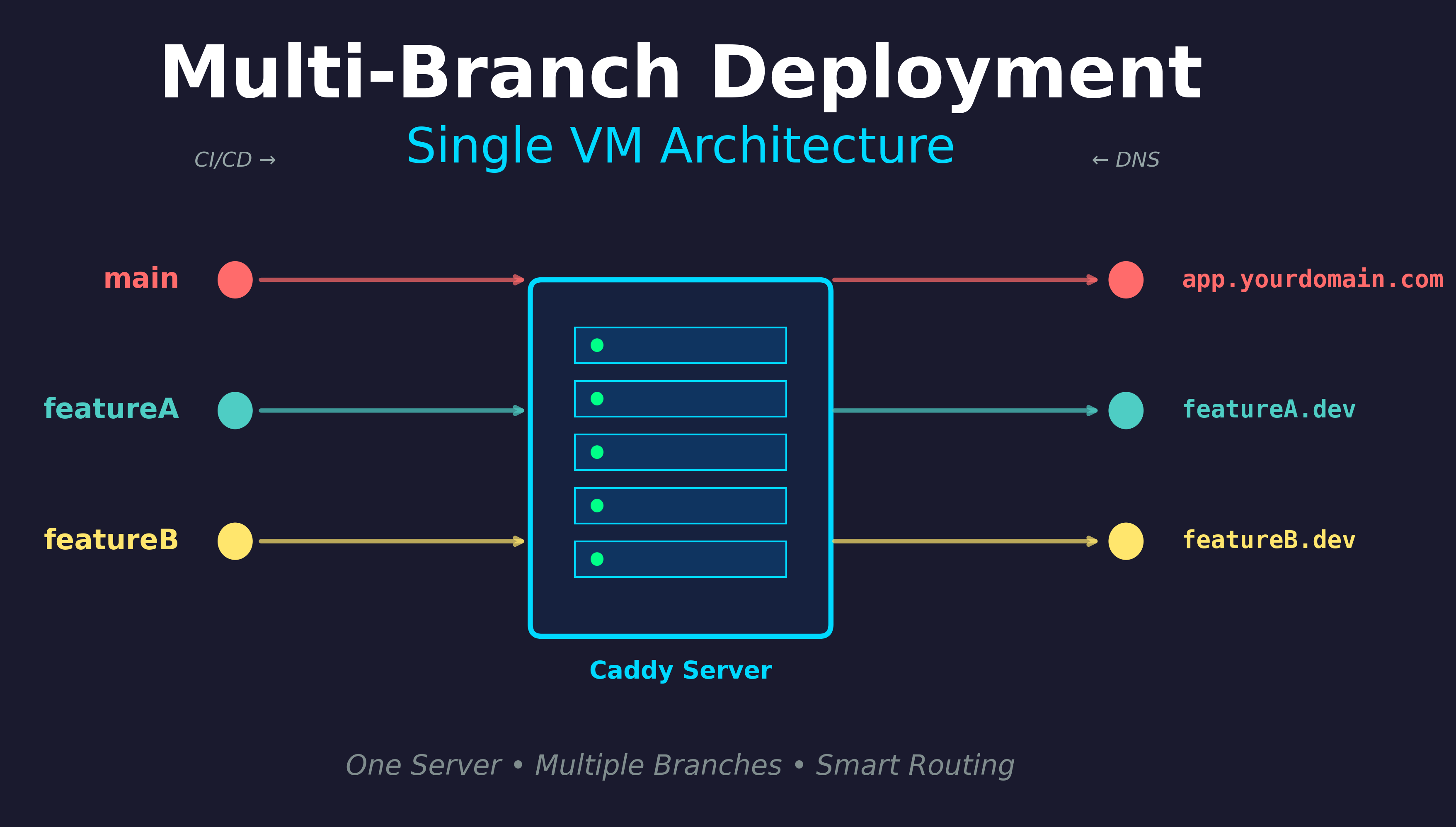
Vercel provides sites like {branch}.vercel.app that show a preview of your changes and it usually builds really fast, which makes it a seamless experience.
This post gets you the same for Django (or any ASGI/WSGI app) on a single VM with Caddy, Python and rsync.
On each push, package the commit as a .tar.gz and rsync it to /workspace/branches/{branchName}.
The VM runs Caddy with caddy-snake. Which means you get automatic HTTPS, support for Websockets and fast static files serving.
Your production app runs on yourdomain.com.
Branches get a subdomain like feature-x.dev.yourdomain.com.
Overview
A → serverIP"] dns2["*.dev.yourdomain.com
A → serverIP"] end subgraph domains["Public Access"] d1["yourdomain.com"] d2["featureA.dev.yourdomain.com"] d3["featureB.dev.yourdomain.com"] end main --> pipeline featureA --> pipeline featureB --> pipeline pipeline --> maindir pipeline --> fadir pipeline --> fbdir dns1 -.-> vm dns2 -.-> vm caddy --> d1 caddy --> d2 caddy --> d3 style repo fill:#e1f5ff,stroke:#0066cc style cicd fill:#fff4e1,stroke:#ff9800 style vm fill:#f3e5f5,stroke:#9c27b0 style dns fill:#ffe0e0,stroke:#d32f2f style domains fill:#e8f5e9,stroke:#4caf50 style caddy fill:#c5cae9,stroke:#3f51b5
- CI/CD: On each push, build a .tar.gz and rsync to /workspace/branches/$BRANCH/.
- VM: Caddy + caddy-snake. Production at yourdomain.com, previews at *.dev.yourdomain.com.
- DNS: A records for yourdomain.com and *.dev.yourdomain.com → VM IP.
- Caddy: Single configuration file and automatic HTTPS.
1. Deploy pattern: tar.gz + rsync
On every push (e.g. in GitHub Actions or GitLab CI), do something like:
# Example: in CI, after checkout
BRANCH_NAME="${GITHUB_REF#refs/heads/}"
tar -czf app.tar.gz \
  --exclude='.git' \
  --exclude='__pycache__' \
  --exclude='.venv' \
  .
rsync -avz --delete app.tar.gz \
  deploy@YOUR_VM_IP:/workspace/branches/"$BRANCH_NAME"/
ssh deploy@YOUR_VM_IP "cd /workspace/branches/$BRANCH_NAME \
  && tar -xzf app.tar.gz \
  && rm app.tar.gz \
  && uv sync \
  && uv run manage.py migrate \
  && uv run manage.py collectstatic --noinput"
Sanitize branch names in CI if needed (e.g. replace / with -) so the path and subdomain match.
The server can create the venv per branch with uv sync (as in the example) or you can ship a pre-built .venv.
2. Caddy + caddy-snake
Install Caddy with the caddy-snake plugin (see repo for build steps; releases often include a binary).
Example Caddyfile
- Production: yourdomain.com → fixed working_dir for main.
- Previews: *.dev.yourdomain.com → working_dir uses the placeholder; autoreload so the next request after a push serves the new code.
yourdomain.com {
  handle_path /static/* {
    root * /workspace/branches/main/staticfiles
    file_server
  }
  route {
    python {
      module_wsgi app:wsgi.application
      working_dir /workspace/branches/main/
      venv .venv
    }
  }
}

*.dev.yourdomain.com {
  handle_path /static/* {
    root * /workspace/branches/{http.request.host.labels.3}/staticfiles
    file_server
  }
  route {
    python {
      module_wsgi app:wsgi.application
      working_dir /workspace/branches/{http.request.host.labels.3}/
      venv .venv
      workers_runtime thread
      autoreload
    }
  }
}
Notes:
- workers_runtime thread is required with placeholders and autoreload.
- Use your Django WSGI path (e.g. mysite.wsgi:application) instead of app:wsgi.application.
- The branch directory must exist before the first request (CI creates it). Caddy-snake loads and caches the app on first request; autoreload watches for .py changes after each deploy.
- Set Django’s STATIC_ROOT to staticfiles so collectstatic matches the staticfiles/ paths in the Caddyfile.
Subdomain → branch name
Caddy splits the host into labels, right to left: for featureA.dev.yourdomain.com, labels.0 = com, labels.1 = yourdomain, labels.2 = dev, labels.3 = featureA. So the branch is {http.request.host.labels.3} for *.dev.yourdomain.com.
Adjust the index if your dev domain has a different structure.
3. DNS configuration
Add an "A record" for @.dev.yourdomain.com (use wildcard depending on your DNS provider) pointing to the VM’s IP.
After propagation, Caddy can obtain a cert for *.dev.yourdomain.com via ACME and route each subdomain to the matching branch directory.
4. What happens at runtime
- First request to feature-x.dev.yourdomain.com: Caddy resolves the placeholder to /workspace/branches/feature-x/; caddy-snake loads and caches the app. If that directory doesn’t exist yet (branch not deployed), the request fails until CI has run.
- After a push: CI overwrites the branch directory; the next request triggers autoreload and serves the new code.
- New branch: Push → CI creates the directory → first request to new-branch.dev.yourdomain.com loads it.
Push a branch, wait for CI, then open {branch}.dev.yourdomain.com.
Bonus: clean up on merge
When a branch is merged and deleted, trigger a pipeline step that removes its directory on the VM (e.g. ssh deploy@VM "rm -rf /workspace/branches/$BRANCH_NAME"). Caddy-snake sees the directory is gone and stops serving that app; the next request to {branch}.dev.yourdomain.com fails until a new branch with that name is deployed. That keeps preview URLs only for active branches and frees disk space.